

My dev environment: Nix, git, just, backlog, Claude Code
I juggle a lot of code across many repositories: work, personal, and forks. Every time I revisit a project, I have to reconstruct my own mental context window before I can be productive: what is this, what does it do, how do I build it, how do I test it? Over the years I learned tricks that shrink that context switch, and they help a human, an AI agent, and CI in the same way.
This is the development half of my stack: Nix, git, just, and backlog, kept local-first, with Claude Code as the AI agent that drives them. The machine it all runs on is a companion post, My machine: Linux, NixOS, zellij.
I wrote this for engineers who are tired of "works on my machine" and want to know whether declaring everything actually pays off. It does. I have paid the learning cost, and I will tell you where it still bites, because some of it does. But learning is fun. Do not stop learning, or you would still be on Windows. :)
TL;DR, the learnings:
- Define the environment, do not mutate it into being. Declare it as text, rebuild it, throw it away.
- Nix gives you reproducible software on any distro. Locked dependencies mean the same result on your laptop, on the runner, and next year.
- Put every verb in a justfile; let CI call those recipes. Onboarding and CI both collapse to
just --list. No CI-only steps. - Track work in git too, not a server.
backlogstores tasks as markdown files, so humans and agents capture without racing to a central app, and every task records its why. - Hand the AI agent your tools, not a parallel stack. Claude Code, but no MCP servers (harness-only, not composable) and no giant third-party stacks. Context engineering plus feedback, task management, and low-friction tooling is what delivers.
- Keep the working tree on local disk. Not NFS, not SSHFS. Build elsewhere with
git push, not by mounting. - Containers run services; they do not host development. Reach for podman over Docker when you do want one.
Nix: locked dependencies that run anywhere
Nix gives you software, in any wrapping you want. If you use software, you want Nix. It runs on every distribution, not just NixOS. Adopt it on Ubuntu or Fedora and you get the important half: exact, locked dependencies that ship with your software. Your build runs on someone else's computer because it brought its own world, pinned to exact hashes.
I know it will not be sensitive to whatever glibcglibcThe GNU C Library, the standard C runtime most Linux binaries link against. Version differences between machines are a classic "works on mine" bug.gnu.org/software/libc that machine ships. I know it will behave the same next year and on the next box. That stability across time and machines is the whole reason I stop caring which Linux is underneath.
The mechanism is content addressingContent addressingNaming data by a hash of its contents instead of a location or a version label. Identical content always gets the same name, so a cache can dedupe it and trust it.. A Dockerfile usually starts with apt-get update: the repositories are not baked in, so the build reaches out to a moving target, and a clean build today and next week gives two different images. NixNixA purely functional package manager and build system. It describes software as data and builds each package in isolation, keyed by a hash of all its inputs.nixos.org does not do that. You declare the inputs as text and materialize them, every time, not once. It tree-hashes the inputs and asks the local Nix store whether that exact tree was already built. Hit: reuse it. Miss: build it. That is what idempotentIdempotentAn operation you can repeat with the same effect as running it once. Same inputs, same output, fetched straight from cache the second time. actually means here. Point Nix at another machine's cache and it fetches a prebuilt result instead of rebuilding it.
Same idea as my VirtualBox-layers post: the cache key is the content, not the clock.
git: the decentralized source of truth
git holds the truth, and it is decentralized, which I lean on more than most people do. My machine config lives in git, so I reinstate a box from a repo. And when I want a build to happen on a beefier machine, I do not mount anything: I commit and push, and the work moves with the history. git is the transport, and like Nix it is local first, with efficient transfers and sync.
just: the workspace's documented verbs
just is a composable command runner, and it is how someone onboards into a workspace in one command. It looks like a Makefile, so people mistake it for one. Make is a build system. Using make as a command menu is a misuse: it fights you the moment a "target" is not really a file.
justjustA command runner: define named recipes (build, test, serve) in a justfile and run them by name. It is not a build system.github.com/casey/just is the runner people often misuse GNU Make as. Every project workflow becomes a named recipe: build, test, serve, deploy. Recipes take parameters. They can be tagged into groups. Each carries a comment, and just --list prints the whole documented menu:
$ just --list
Available recipes:
  build           # build the site into ./result
  serve           # stop prior server, rebuild, serve on :8099
  preview url=""  # open a page in a throwaway browser profile
A newcomer types one command and sees every verb the workspace supports, documented, in order.
And it composes. A top-level justfile pulls in recipes from subfolders, or from git submodules, so a monorepo or a project-of-projects has one coherent command surface instead of a README full of copy-paste. That is why I reach for it over make every time: make builds artifacts, just runs workflows.
backlog: tasks in git, shared by humans and agents
A task tracker does not need a server. backlogBacklog.mdA task manager that stores each task as a markdown file inside the repository and drives it from the command line, so the backlog lives in git rather than on a server.github.com/MrLesk/Backlog.md keeps every task as a markdown file in the repo. The plan lives next to the code it describes, moves with git push, and branches and merges like anything else.
That kills the thing I hate about Jira and its kin: the race to a server. When a human and an AI agent both want to add a task, they do not queue behind one web app holding a lock. Each writes a file and commits. Conflicts resolve the way code conflicts do. No login, no round trip, no central box that has to be up. It is the same local-first property as git and just, applied to the plan instead of the code.
And a task carries its motivation, not just a title. Each one records a description, its acceptance criteria, and the reason it exists. Six months later the "why" is still in git, instead of evaporated from a chat log or someone's memory.
That last part is what makes it good for an AI agent. An agent's context window is short and gets compacted; a backlog is durable memory it can trust. It creates tasks, orders them, ticks off acceptance criteria, and picks up where a prior session dropped the thread, because the state is on disk, not in the conversation. The same file a human reads is the plan the agent works from. Give an agent a good tracker and it organizes its own work instead of losing it.
Claude Code: the agent that drives the stack
I run an AI agent on top of all of this, and the stack is what makes it work. The agent is Claude CodeClaude CodeAnthropic's terminal-based coding agent: it runs in your shell, reads and edits the repository, and runs your commands directly.claude.com/claude-code, and it is only as good as the tools you hand it and the context you keep. The local-first, composable pieces above are not incidental to that. They are the point.
I do not use MCPMCPModel Context Protocol: a standard for exposing tools and data to an AI model through a dedicated server that the agent's harness connects to.modelcontextprotocol.io servers. They live inside the agent's harness and nowhere else, so they do not compose: I cannot pipe one into the next, call it from a justfile, or run it in CI. A just recipe is the opposite. A human, the agent, and the runner all call the same verb. I would rather hand the agent the exact command surface I use than a parallel one only it can reach.
I also skip the big third-party Claude Code stacks. They are large, someone else's, and opaque. My tooling is small and home-made, so I understand every edge of it and can fix it when it breaks. Borrowed abstraction is the "works on someone's machine" problem wearing a new coat.
What actually gets results is context engineeringContext engineeringDeliberately choosing what information sits in the model's limited context window at each step, instead of dumping everything in and hoping., and it is not magic. Understand what the model needs in front of it, then divide and conquer: split the work into tasks, give each a tight feedback loop that says when the agent is wrong, track those tasks somewhere durable, and keep the tooling low-friction so the agent spends its context on the problem, not on the setup. Feedback, task management, low-friction tooling. The backlog is the task management. just is the low-friction surface. Nix and git make the feedback reproducible. Get those right and the agent stops being a demo and starts being a coworker.
CI calls just, it does not replace it
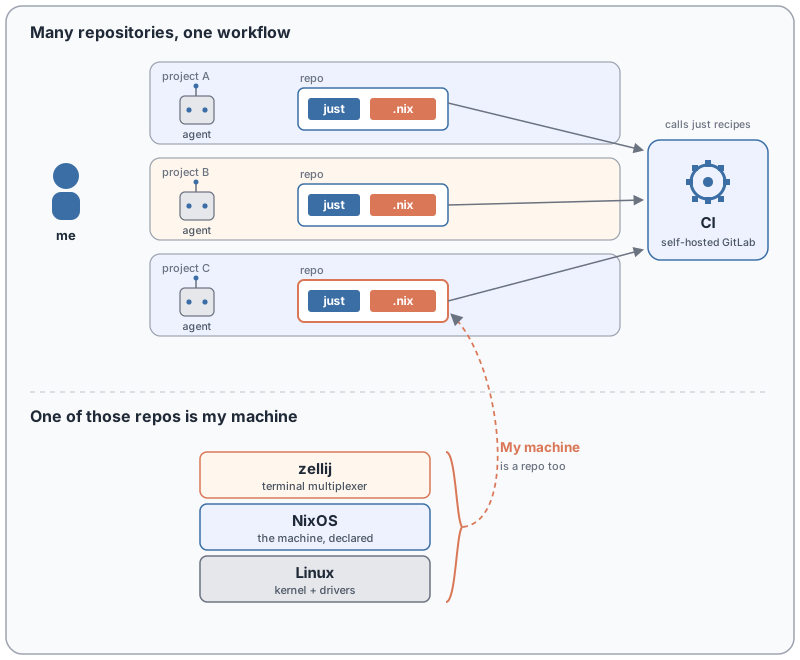
I run my own CI (self-hosted GitLab), and it is not allowed to know anything the terminal does not. Iterating against CI is slow: push, wait for a runner, read a log, push again. You do not want that loop while developing. You want CI for what it is good at, parallelism and enforcing gates. But it becomes a bottleneck the moment every developer iterates against it, and it is hard to debug.
So do not presume CI. Be local first. The justfile is how you get there: define every recipe, every verb, every test, every capability of the workspace in it, where a human or an AI agent can run it directly. Then keep the CI surface thin by having CI call those same recipes. just lint, just test, just build: the pipeline runs the exact commands you run.
The failure mode is a CI-only recipe. The moment a step lives only inside the pipeline YAML, you have locked yourself into a CI ecosystem you cannot reproduce on your own machine, and a red build becomes a guessing game because you cannot run the failing step locally. Keep the logic in just and let CI be a thin caller. The same command then works on your laptop and on the runner, because of Nix. Network and microservices are their own can of worms, but the build and test surface stays portable.
Develop locally, always
Your code belongs on local disk, not on a network. I should not have to say this, but working off NFS is still common practice at companies I have worked for. Every operation that matters when you develop, a build, an edit, a test, is either bandwidth-heavy or round-trip-latency-sensitive, and I refuse to wait.
So no NFS, no SSHFSSSHFSMounts a remote directory over an SSH connection as if it were local. Convenient, but every file operation pays the network round trip., no network drive holding the working tree. They are clunky slow glue, and they will infuriate you with latency spikes and a long tail where one save randomly stalls for a second. Keep the tree local, work at local speed. If you want it built somewhere stronger, you already have the answer: commit and push. git carries it there.
What I don't use: containers for development
Containers are for running services, not for building them. That is what they cater to, and they are good at it. Isolation is the whole point. A service should be contained; prying that isolation open to make a container pleasant to develop in is fighting the tool.
Try to live in one and the friction shows up fast:
- User mapping. The container runs as a different user than you. Your SSH keys, your git config, your dotfiles: none of it is there. You bind-mount and remap each one, and it is annoying every single time.
- Invisible processes. cgroupscgroupsLinux control groups: the kernel feature that limits and isolates a process tree's resources. Part of what gives a container its separate view of the system. mean the container does not see the host's process world. You are not dropped into your usual environment; you land in a stripped, strange one.
- Debugging. Your editor's debugger cannot just attach. GDB from the editor now means remote debugging, with all the setup that drags in.
None of these are bugs. They are the isolation working as designed, and that design is right for a service and wrong for a development box.
When I do want a container, for an isolated service that should stay isolated, I reach for podman, not Docker. Docker's daemon and the --privileged habit are a security risk I do not want running on my machine. PodmanPodmanA daemonless, rootless container engine with a Docker-compatible CLI. No always-on privileged daemon to attack.podman.io runs rootless and daemonless: same images, far less attack surface.
Local first, all the way down
Nix, git, just, and backlog share one property: they run on my machine first, and everything else, CI or another builder, is a thin caller. Define the environment, do not mutate it into being, and the same commands work everywhere. Claude Code rides on top of that stack rather than beside it: the local-first substrate is exactly what makes the agent effective.
The machine that runs all of this is declared the same way, in one file, in git. That is the companion post: My machine: Linux, NixOS, zellij.
Source: Nix, git, just, backlog, Claude Code.